Anyone setting up restock alerts meets a pile of terms quickly: variants, available quantity, double opt-in, deliverability, attribution. Some are Shopify-specific, some come from inventory management and some from email marketing, and they are often used loosely. This glossary is one you can keep open in a tab: it defines twenty-five of them in a sentence or two each, and points to a longer guide where we have one. The definitions are general, not legal or technical advice. Where a term touches Griffin, we describe only what Griffin publishes, such as variant-aware alerts, double opt-in and email-only sending.
Alerts, Signups and Products
Back-in-stock alert
An email sent to a shopper when a sold-out product becomes available again. The shopper asks for it by entering their email on the sold-out page. See the complete guide.
Notify Me button
The button or form on a sold-out product page where a shopper signs up for a restock alert. Placement and wording affect how many people use it.
Waitlist
A list of people who want a product that is unavailable. It can simply notify people when stock returns, or it can manage the order in which people get access. See notifications versus waitlists.
Variant
One specific version of a product, such as a size, color or pack size. On Shopify, stock is counted per variant. See variant-level alerts.
SKU
A stock keeping unit: a code that identifies one variant for inventory purposes. Each variant normally has its own SKU.
Track quantity
A Shopify setting that makes Shopify count the stock of a variant. If it is off, restock alerts cannot detect a restock. See the Track quantity setting.
Available quantity
The number of units of a variant that can be sold right now, after any units that are committed to orders are removed.
Continue selling when out of stock
A Shopify option that lets customers keep ordering a variant at zero stock. The variant never shows as sold out. See alerts when continue selling is on.
Backorder
An order taken for a product that is not currently in stock and will be fulfilled when stock arrives. See alerts versus preorders.
Preorder
An order taken before a product is released or has arrived, usually with a stated ship date. It differs from a restock alert, which only notifies.
Inventory and Stock Terms
Presale
A sale that opens before general availability, often at a launch. The term overlaps with preorder.
Stockout
A period when a product has no available stock. See our stockout postmortem template.
Safety stock
Extra inventory kept to cover uncertainty in demand or supply. See reorder points and safety stock.
Reorder point
The stock level at which you place a new order so that stock arrives before you run out.
Lead time
The time between placing an order with a supplier and receiving the goods.
Sell-through rate
The share of received stock that has sold in a period. See the sell-through rate calculator.
Put the terms to work. Griffin adds variant-aware Notify Me to sold-out products and is free to start.
Install Griffin on ShopifyEmail and Measurement Terms
Double opt-in
A two-step signup in which the shopper confirms their email address before being subscribed. Griffin supports double opt-in. See double opt-in and GDPR basics.
Unsubscribe
A subscriber's request to stop receiving emails. It should be honored immediately.
Deliverability
How reliably your emails reach the inbox rather than spam or being blocked. Sender setup and complaints both affect it.
SPF and DKIM
Email authentication records that help mailbox providers verify that a message really came from your domain. See emails going to spam.
Sender reputation
A mailbox provider's judgment of how trustworthy your sending is, based on signals such as complaints and bounces.
Bounce
An email that could not be delivered, for example because the address does not exist. See what email metrics really tell you.
Click-through rate
The share of recipients who click a link in an email. A stronger signal than opens for restock emails.
Attribution
Linking an order to the email or campaign that led to it. See measuring revenue from restock alerts.
Demand signal
Evidence of how much customers want a product, such as signup counts on a sold-out page. See tracking customer demand.
How the Terms Fit Together
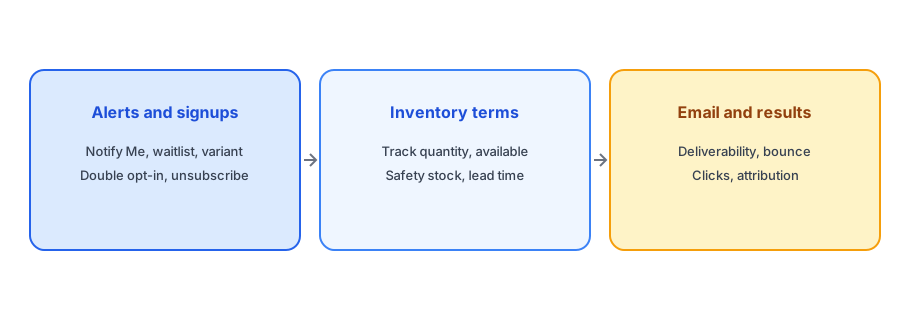
The terms describe one chain. A shopper reaches a sold-out variant, signs up through the Notify Me button and, if double opt-in is on, confirms their address. Shopify tracks the available quantity, and when it rises from zero the app emails the subscribers of that variant. Good deliverability gets the email to the inbox, and clicks and attribution show whether it produced orders. Weak links appear when any step is missing: tracking off, a late inventory update, a missing authentication record or a broken link. Our ten-minute test plan walks the whole chain, and our FAQ of thirty questions gives short answers to the rest.
Terms People Confuse
Three pairs cause most of the confusion. A waitlist and a restock alert overlap, but a waitlist can also control who gets access first. A preorder and a backorder both take money before stock is on hand, but a preorder usually ties to a release date while a backorder follows an unplanned stockout. And low-stock alerts and back-in-stock alerts point in opposite directions: one warns you that you are running out, the other tells a customer you are back. Our posts on low-stock versus back-in-stock alerts and back-in-stock versus preorder go through the differences.
The Bottom Line
Knowing the vocabulary makes it easier to choose an app, read its settings and explain a problem to support. Griffin is a Shopify back-in-stock app you can install from the Shopify App Store, free to start.